












Real-time codes.
Zero screen hijacking.
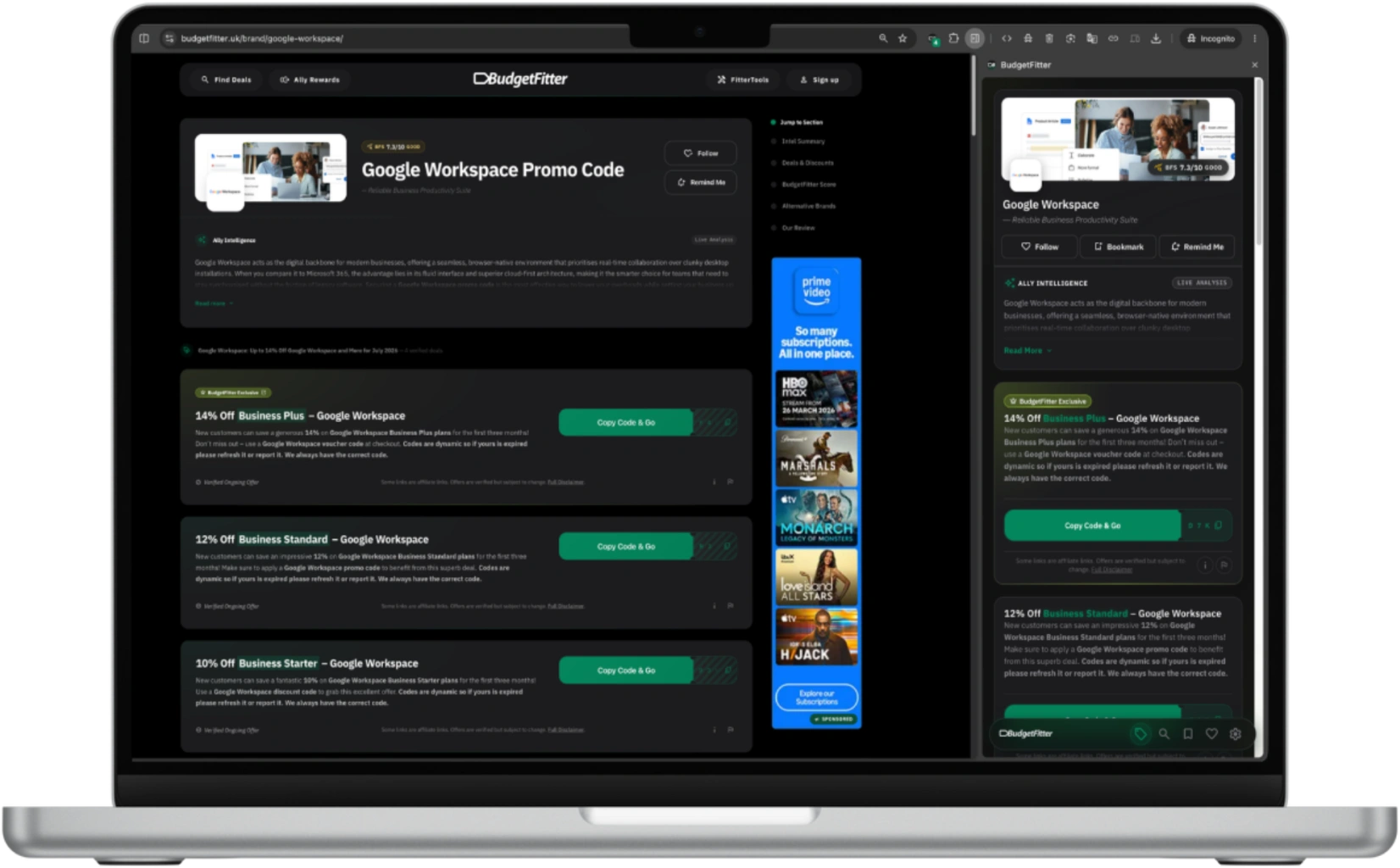
BudgetFitter docks smoothly to your browser’s native Side Panel. Tested coupon codes, automatic cash discount stacking, and unbought BFS audits without popup chaos.
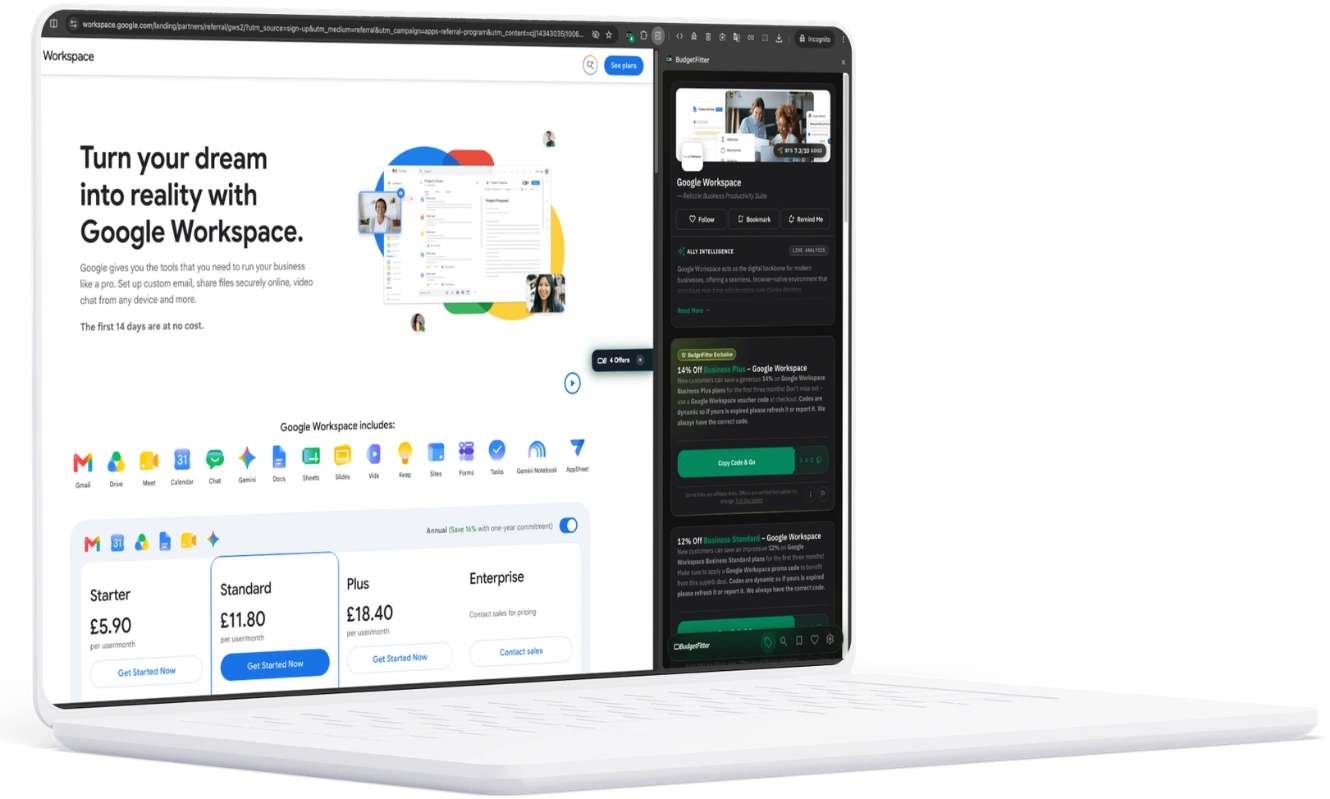
Zero intrusive popups.
Pure checkout intelligence.
We engineered the extension for developers, founders, and smart spenders who hate bloated coupon toolbars: native Side Panel architecture, right-click instant search, unbought BFS audits, and 1-click code application.
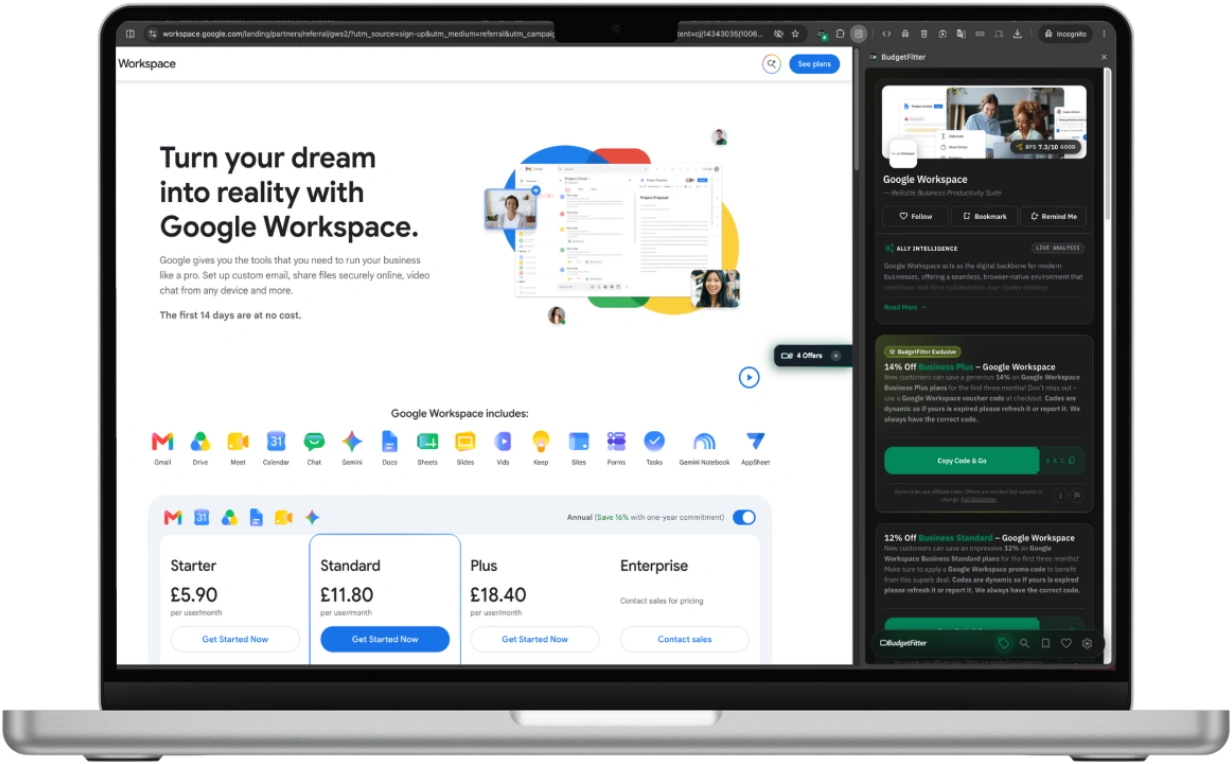
Docked to your side panel.
Never blocking your checkout.
Say goodbye to aggressive, screen-blocking coupon modals that hijack your browser. BudgetFitter lives natively inside Google Chrome and Microsoft Edge side panels—opening only when you want it, staying out of your way while you compare pricing.
- Zero DOM manipulation or screen-covering intrusive modals
- Always accessible without losing your place on the merchant page
Subtle edge indicators.
Zero annoying pop-up modals.
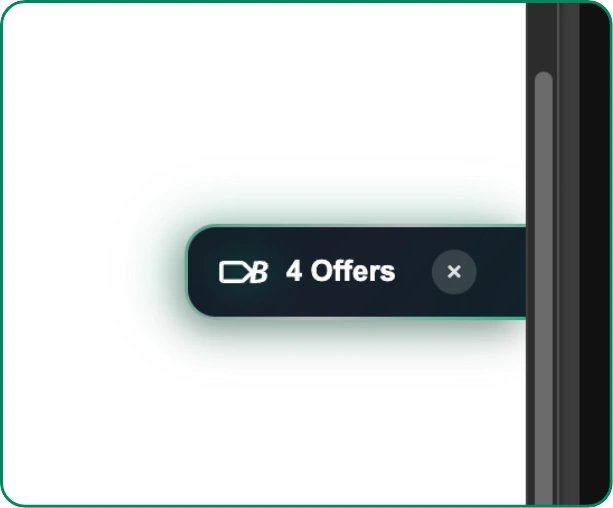
When you land on a merchant site with verified discounts, a discreet, ultra-light edge pill appears quietly on your browser border. No flashing banners, no sound effects, and no screen interruptions. One click expands the side panel; one click dismisses it.
- Discreet offer counter docked silently at the screen border
- 1-click instant dismiss with zero recurring nag prompts
Highlight any brand or tool.
Search deals in one click.
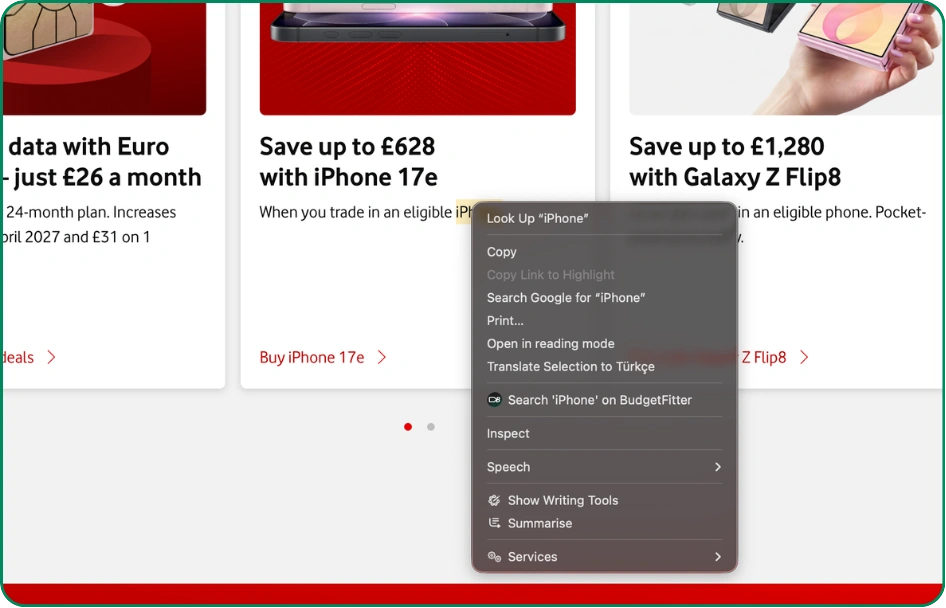
Reading an article or comparison review? Highlight any keyword, developer tool, or product name, right-click, and select “Search on BudgetFitter”. The extension queries our live verified database without requiring a new search tab.
- Deep browser context menu integration
- Instant verified pricing & coupon checks for highlighted text
BudgetFitter Score (BFS) · Unbought, mathematical trust ratings.
Every promo code and merchant offer is scored in real time by our independent 10-point audit. Check renewal terms, discount legitimacy, and actual checkout success before entering your credit card.
- 100% human-tested promotional codes before publication
- Independent 10-point audit covering subscription traps and pricing honesty
Strict Permission Sandbox
The extension only runs on merchant checkout domains where active deals exist. It has zero access to your search history, passwords, or personal account sessions.
Zero browsing history tracking.
Zero cookie hijacking.
Unlike traditional coupon scrapers that log your full browsing history, resell shopping intent data, or inject affiliate cookies on unrequested pages, BudgetFitter operates within a strict privacy-first sandbox. We never harvest your keystrokes, personal info, or browsing trails.
- Strict Manifest V3 permission sandboxing
- Zero cookie drops on unrequested merchant domains
Frequently Asked Questions
Everything you need to know about the official BudgetFitter browser extension for Chrome and Edge.
Who is BudgetFitter for?
BudgetFitter is designed specifically for creators, solopreneurs, digital builders, and modern spenders who refuse to pay the “Lazy Tax” on the tools, travel, and services they rely on every day.
Because BudgetFitter was built by digital practitioners, remote operators, and frequent travellers ourselves, we understand the real friction points. We aren’t a generic coupon site filled with random fast-fashion spam — our curation is tailored around three core groups:
- Digital Creators & Solopreneurs: Anyone building modern digital projects — developers, designers, indie hackers, and freelancers looking for verified savings on cloud hosting, SaaS platforms, AI suites, business accounting, and domain infrastructure.
- Modern Explorers & Remote Professionals: Frequent travellers and digital nomads who need transparent rates on flight bookings, regional rail networks, travel eSIMs, airport lounges, and hotel stays without hidden conversion fees or renewal traps.
- Smart Households & Conscious Spenders: People who value their time and money — looking for verified deals on broadband switches, smart home tech, meal kits, gym memberships, and direct sourcing without endless spam or dead promo codes.
If you value straightforward transparency, hand-verified codes, independent BFS trust ratings, and zero checkout friction, BudgetFitter is built for you.
Why did BudgetFitter transition from a traditional coupon aggregator to a curated perks and software savings network?
When BudgetFitter originally launched in 2023, like many savings platforms, we listed a broad range of generic retail discounts. However, as digital practitioners, software builders, and frequent travellers ourselves, we quickly discovered that the traditional coupon aggregator model was fundamentally broken.
Most traditional voucher sites operate on low-quality automated scrapers — flooding search engines with expired discount codes, deceptive clickbait buttons, aggressive advertising pop-ups, and predatory cookie stuffing. At the same time, consumers and professionals were facing the “Lazy Tax”: quiet renewal price spikes on software subscriptions, sneaky contract tie-ins, and hidden fees across cloud hosting and travel services.
To fix this properly, we spent over 12 months conducting rigorous market research and real-world A/B testing in a dedicated sandbox project. We tracked actual checkout friction, analysed renewal churn, and studied how digital creators, developers, and travellers interact with commercial offers. That deep research proved that users don’t want 10,000 spammy listings — they want a curated, high-trust selection of verified partners that genuinely save them time and money.
Guided by these findings, we executed a transparent strategic pivot:
- Strict Merchant Gatekeeping (Zero Junk Onboarding): We no longer accept just any merchant. We actively reject low-trust aggregators, predatory subscription models, and unverified discount scrapers. Every listed brand must pass our editorial standards.
- Refocused on 5 Core Action Pillars: We concentrated our editorial curation where recurring expenses and contract traps are highest: Create & Build (cloud infrastructure, hosting, developer tooling), Scale & Manage (SaaS platforms, AI suites, business operations), Travel & Explore (flights, trains, eSIMs, airport lounges), Live & Thrive (health, smart tech, broadband), and Global Marketplaces.
- Introduced the BudgetFitter Score (BFS): We built an independent, algorithmic trust rating (0–100) on every brand page that evaluates pricing honesty, cancellation transparency, and real checkout value. BFS scores are 100% independent and can never be bought or sponsored.
- Tailored for Practitioners & Smart Spenders: We structured our ecosystem for software developers, digital creators, AI solopreneurs, remote workers, and conscious spenders who need verified factsheet data, API/MCP connectivity, and zero checkout friction.
Today, BudgetFitter is proud to stand as an independent consumer savings watchdog — eliminating the Lazy Tax through hand-verified partner rates, transparent merchant teardowns, and actionable buying guides.
What is the difference between following a brand on BudgetFitter and bookmarks in the extension?
Following a brand is tied directly to your BudgetFitter account and syncs across both our website and mobile app, adding that brand’s deals to your unified Deal Feed. If you use the mobile app, following a brand also enables instant push notifications on your phone for new deal drops.
The Bookmark feature in the browser extension is stored locally in your browser, providing you with quick access to your favourite shops directly from your web browser while shopping on your computer.
What does the BudgetFitter browser extension do?
The BudgetFitter browser extension is your point-of-purchase savings ally. Built on the latest Manifest V3 standard, it works quietly in the background while you browse: when you land on a partner store, it instantly checks whether we have any verified deals or voucher codes for that site and alerts you — bringing our entire deal database to you at the exact moment you need it. It never injects codes or acts without your say-so; you stay in full control.
What makes the BudgetFitter extension “smarter and safer” than others?
Your security and control are our top priorities. Unlike many extensions that automatically inject codes into a checkout page — which can be a security risk and can hijack your tracking — we never do that. Built on the modern Manifest V3 standard, our extension simply finds deals and alerts you from a clean side panel; you stay in complete control of copying and applying any code. We also collect zero browsing history. That privacy-first approach is what makes us the safer choice.
Does the extension track my browsing or slow down my browser?
No. The extension is built for privacy and speed. We collect zero browsing history — it only checks the site you’re actively on to see whether a verified deal exists, and never tracks where else you go. Because it’s built on the lightweight Manifest V3 standard, it runs quietly in the background without slowing your pages down, and it never injects code or claims tracking without your explicit click.
How do I install the browser extension?
You can install it directly from the Chrome Web Store. Simply search for “BudgetFitter: Savings & Deals” and click “Add to Chrome.” The installation takes just a few seconds.
Which browsers can I use the extension on?
The BudgetFitter extension is currently available for Google Chrome and other Chromium-based browsers (such as Microsoft Edge, Brave and Opera). We are always working to expand to more browsers in the future.
How will I know if the extension has found deals on a site I am visiting?
The BudgetFitter icon in your browser toolbar acts as a live alert. When you are on a site with no deals, the icon will be grey. The moment you land on a partner retailer’s page, the icon will light up in colour and display a small badge with the number of offers found.
How do I use a voucher code found by the extension?
When the extension notifies you of available codes on a checkout page, you can click the notification to see the deals. For your security, simply click the “Copy” button next to the code you wish to use, and then paste it into the voucher box yourself. This ensures you always have full control.
Why doesn’t the extension automatically apply codes like other extensions do?
We believe you should always be in complete control of your checkout process. Automatic code injection can sometimes interfere with a website’s functionality or apply a code you didn’t intend to use. Our “user-in-control” approach is safer and ensures there are no surprises when you pay.
What is the “side panel” and how do I use it?
The side panel is a convenient way to view all available deals for the website you’re on without leaving the page. It sits neatly to the side of your browser so it never disrupts your shopping. You can open it at any time by clicking the BudgetFitter icon in your browser toolbar.
How does the “right-click to search” feature work?
If you see a product or brand name mentioned anywhere on the web, you can highlight the text, right-click on it, and select “Search for deals on BudgetFitter” from the context menu. This will instantly search our platform for related savings.
Does the extension adapt to my browser’s Light or Dark Mode?
Yes, it does. The extension is designed to automatically detect your system or browser theme and will switch between Light and Dark Mode to provide a comfortable viewing experience.
Can I stop the extension from appearing on certain websites?
Yes. We understand you may not want to see alerts on every site. From the extension’s settings page, you can easily add any website to an “exclude list.” The extension will not activate or show notifications on any of the sites you have listed.
What are FitterTools?
FitterTools are BudgetFitter’s suite of smart savings technology and curated intelligence designed to help you beat the Lazy Tax. Rather than just giving you a discount code, FitterTools empower you to make smarter, more confident purchasing decisions across all areas of spending.
The FitterTools suite includes:
- Browser Extension: Instantly alerts you to verified codes at checkout.
- Mobile App: Your pocket savings hub with push alerts and a custom Deal Feed.
- Quizzes: AI-powered interactive guides that match products (broadband, mobile, eSIMs) to your exact needs.
- PriceFit: Multi-provider price comparison engines (coming soon).
- Reviews: Unfiltered product teardowns and expert brand analyses.
- The Fitter Newsletter: Weekly curated briefings, hacks, and exclusive discount codes.
How do I contact support or get help?
We’re here to help. For general questions, head to our Contact Us page and our team will get back to you.
For specific issues, the fastest routes are:
- Ally Rewards: Use the in-app ‘Report an Issue’ option on your claim — it’s tracked and prioritised.
- A deal or code: Hit the Report button on the deal card to flag it straight to our team.
App users also receive priority support on reward-tracking enquiries.
Never overpay at checkout again.
Add BudgetFitter to your browser in one click. Completely free, no intrusive spam, zero telemetry selling.
*¹ Chrome & Edge Compatibility: BudgetFitter Extension is designed for Google Chrome, Microsoft Edge, Brave, and other Chromium-based desktop browsers supporting the Manifest V3 API.
*² Privacy & Data Ethics: The extension operates on a strict zero-telemetry policy. We do not track, store, or sell your browsing history, keystrokes, or search queries.
*³ BFS Evaluation: The BudgetFitter Score (BFS) is generated independently based on mathematical audit criteria and cannot be influenced by merchant sponsorship.



