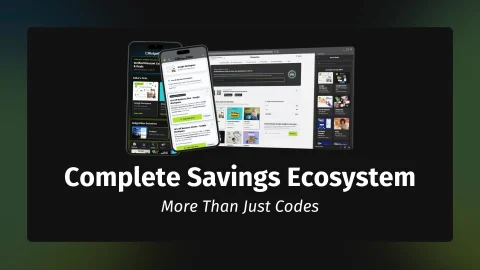
Partner of the Month:Commercial Partner: Google Workspace: Google Workspace is our featured commercial partner for this placement. When this disclosure is absent, featured products and brands are evaluated solely through our independent editorial standards and cannot be bought.Save up to 15% on Google Workspace with custom business email & Gemini AI
Focused spotlights on specific promotions, campaigns, and limited-time offers — breaking down exactly what's worth grabbing.View all in Deal Spotlightsarrow_forward
Stop searching. Auto-apply verified discount codes at checkout — free.
Exclusive cash rewards and bonus payouts to maximise your savings.
auto_awesome
Join AllyRewards to Start Claiming Gift Cards
Register for campaigns, generate unique tracking links, and claim gift card rewards fulfilled by AllyRewards for your purchases, subscriptions and trials.
We independently verify every offer. When you buy through our links, we may earn an affiliate commission.Learn more
7-day free trial. Pay monthly or yearly. Cancel anytime.
10% Off Pixlr Plus – Ad-Free Basics
Grab Pixlr Plus for 10% off at $2.24/mo with ad-free editing and 80 AI credits. Perfect starter plan. Click the button and follow the instructions on the landing page.
7-day free trial. Pay monthly or yearly. Cancel anytime.
30% Off Pixlr Premium – Limited Time
Level up your edits with Pixlr Premium at 30% off - just $6.99/mo. Includes 1000 AI credits and full access. Click the button and follow the instructions on the landing page.
Pixlr remains a robust choice for those who require professional-grade layer editing and generative AI tools directly within a web browser, successfully bridging the gap between basic filters and cumbersome desktop software. While the free tier is serviceable for casual edits, the Premium suite is where the platform truly shines for professional creators who need to optimise their workflow without the overhead of heavy installations. It is a highly capable, browser-based cloud photo editor and AI creative suite that avoids the bloat often found in industry-standard competitors.
To secure the most favourable terms, we have negotiated an 30% Off Pixlr Premium offer that represents the best value for power users. We recommend prioritising this [BudgetFitter Exclusive] arrangement, as it is verified by our team to provide a significant reduction on the full suite of AI-powered features and ad-free workspaces. Unlock the code in the list below to apply your discount at the checkout and ensure you are not overpaying for your creative licence. This brand currently holds a 6.9/10 BudgetFitter Score.
verified_userDisclaimer: Ally Intelligence is an informational AI-generated editorial summary based on current deal and brand signals processed by BudgetFitter. The update time refers to this summary text, not coupon or deal refresh timestamps. It is not financial, legal or investment advice.
COMMERCIAL INTELLIGENCE APP
Follow Pixlr. Stop paying the Lazy Tax.
Follow Pixlr and get real-time commercial intelligence on new drops. Personalised deal feeds, calendar reminders, and AllyRewards tracking — built for discerning digital builders. No credit card, no spam.
qr_code_scannerScan to download
storefront
Pixlr at a Glance
Verified merchant background, operating reach and consumer facts.
public
Origin & Heritage
2008 · Stockholm, Sweden (Founded by Ola Sevandersson / Inmagine Group)
domain
Parent Group
Inmagine Group
language
Geographic Scope
Global Cloud Software (Over 500M+ Users & 50B+ Photos Edited Across 160 Countries)
pin_drop
Network & Presence
Pixlr E (Pro), Pixlr X (Express), Pixlr Designer, Generative AI & Batch Editing
group
Primary Audience
Freelance Designers, Social Creators, E-Commerce Sellers, Students & Photographers
support_agent
Customer Support
Live Web Helpdesk, Tutorial Learning Hub & Community User Forum
payments
Accepted Payments
Visa, Mastercard, American Express, PayPal & Apple Pay
local_shipping
Fulfilment & Access
Instant Cloud Web Access via Browser, iPadOS, iOS & Android Apps
An independent benchmark of trust, value and demand — built from first-party insights, user sentiment and external search signals.
Trust & Authority6.3
Value & Exclusivity6.8
Popularity & Demand7.1
auto_awesomeAlly IntelligenceLive Analysis
With a nineteen-year digital heritage, this platform has cemented itself as a staple for creators, boasting a massive user base that spans the globe. The strong domain authority and consistent Google Trends UK performance signal a brand that has successfully transitioned from a simple browser tool to a robust design ecosystem. While the raw popularity metrics are high, the platform’s real strength lies in its Post-Quantum TLS readiness, ensuring that your creative assets remain secure against future-facing digital threats.
However, the disparity between community sentiment and public review platforms is worth noting; while users within the ecosystem rate it highly, the broader Trustpilot footprint remains a point of friction. This suggests a tool that excels for its core, loyal user base but may struggle with broader customer service expectations. For the pragmatic creator, it remains a highly capable, cost-effective alternative to industry-standard suites, provided you value functional efficiency over premium support experiences.
verified_userDisclaimer: Ally Intelligence is an informational AI-generated editorial summary based on current deal and brand signals processed by BudgetFitter. The update time refers to this summary text, not coupon or deal refresh timestamps. It is not financial, legal or investment advice.
24 ratings Submitted by the BudgetFitter community.
Your Opiniontouch_app Tap to vote
How would you rate your overall experience with Pixlr?
verified_userDisclaimer: The BudgetFitter Score (BFS) is an informational algorithmic estimate based on internal and third-party signals. Refreshed on a rolling basis using internal and external trust and demand signals — this also enables us to identify low-rated brands and stop promoting them for your safety. BFS scores are fully independent — no brand can sponsor, advertise, or pay to influence their rating. Not financial, legal or investment advice.
swap_horiz
Alternatives to Pixlr
Explore similar partner brands and compare rates, features and BFS trust ratings.
Founded in 2008 in Stockholm, Sweden by software developer Ola Sevandersson and operating today under the creative multimedia parent Inmagine Group, Pixlr is the global benchmark for browser-based graphic design and artificial intelligence image manipulation. Powering more than 500 million creators across 160 countries with over 50 billion images edited to date, Pixlr democratises high-end raster and vector photo editing by delivering desktop-grade creative performance directly inside any web browser without requiring expensive software downloads.
Whether executing complex multi-layer retouching with precise feather masks in Pixlr E, assembling viral TikTok and Instagram carousels in Pixlr Designer, applying 1-click AI Background Removal to e-commerce product shots, or expanding aspect ratios with Generative Fill, applying a verified Pixlr Promo Code unlocks promotional savings of up to 30% off annual Plus and Premium subscriptions. Our creative software audit at BudgetFitter confirmed that Pixlr operates with hardware-accelerated WebGL rendering, backed by an unrestricted permanent free tier and a 7-day free trial on Premium plans.
Browser-Native Creative Power: Pixlr E, Pixlr X & Generative AI Tools
Pixlr combines intuitive ease with deep multi-workspace creative versatility:
Pixlr E Advanced Photo Editor: A comprehensive layer-based image manipulation suite featuring curves, levels, clone stamps, healing brushes, and RAW image decoding.
Pixlr X Quick Express Editor: A streamlined workspace designed for fast cropping, colour grading, filter overlays, and social media post formatting within 24 hours.
Pixlr Designer Layout Canvas: Create marketing banners, YouTube thumbnails, flyers, and multi-slide carousels with thousands of pre-built templates in under 5 mins.
Cutting-Edge Generative AI Engine: Deploy AI Generative Fill, Generative Expand, and text-to-image synthesis powered by Flux and Stable Diffusion models.
1-Click AI Cutout & Background Remover: Automatically isolates complex hair strands, transparent glassware, and product edges with sub-pixel edge detection.
Batch Image Processing: Resize, watermark, colour-correct, and crop dozens of e-commerce inventory photos simultaneously in your browser.
E-commerce merchants building promotional banners, posters & flyer layouts
Pixlr Batch (Bulk Automation)
Simultaneous batch resize, watermark stamping & format conversion
Automated bulk background isolation across 50+ files
Online storefronts and product photographers standardising large catalog imagery
Tier Architectures: Free Community, Plus Essential & Premium AI Unlimited
Choose the optimal Pixlr subscription tier aligned with your creative production volume:
Free Plan: Provides permanent access to Pixlr E and Pixlr X with essential editing tools, basic templates, and a daily allocation of AI generations.
Plus Plan ($1.99/month or ~£1.50/month billed annually): Removes all advertisements, increases daily AI credit limits, and unlocks premium stock overlay assets.
Premium Plan ($7.99/month or ~£4.90/month billed annually): The flagship tier for power users, offering unlimited AI credits, priority cloud rendering, 50,000+ templates, and batch processing.
Team & Education Licences: Provides collaborative multi-seat workspaces, centralized asset libraries, and discounted volume licensing for schools and universities.
Maximise your editing productivity and manage subscription expenditure with these practical recommendations from BudgetFitter’s software reviewers:
Select Annual Billing to Save 30%: Annual subscriptions provide substantial upfront savings compared to paying rolling month-to-month fees.
Enable Hardware Acceleration in Your Web Browser: Ensure WebGL and hardware acceleration are enabled in Chrome or Safari settings to maximise canvas rendering speeds.
Take Advantage of the 7-Day Premium Trial: Test unlimited AI generative fill and batch editing features risk-free during the 7-day evaluation period.
Save Projects in Native .PXZ Format: Saving complex multi-layer designs as .PXZ files retains editable text layers and masks for future editing sessions.
Pair with Desktop Video Suites: Expand your content production by exporting transparent PNGs and layered assets directly from Pixlr before importing them into your video and motion design pipelines.
Step-by-Step Guide: Upgrading Creative Workflows with a Pixlr Promo Code
Unlock your creative editing suite and claim your promotional savings in five simple steps:
Select Subscription Tier: Visit pixlr.com/pricing and choose between Plus and Premium annual plans.
Create Account: Sign up with your email address, Google account, or Apple ID.
Apply Promotional Code: Enter your verified promotional voucher code in the Promo Code box during checkout to deduct up to 30% off.
Complete Payment: Pay securely using card, PayPal, or Apple Pay.
Launch Browser Workspace: Open Pixlr E or Pixlr Designer and begin editing high-resolution creative assets instantly.
Complementary Digital Infrastructure, Web Tools & Productivity
To discover more savings across design, video & stock media, explore BudgetFitter’s canonical Design, Video & Stock Media Hub. Shoppers and professionals investing in Pixlr can also optimise everyday value with verified complementary lifestyle and workflow partners, including XP-Pen for professional studio recording and creator hardware, AVCLabs for generative AI video and content workflows, Viking Direct for bespoke merchandise printing and packaging solutions, FlexiSpot for ergonomic desk setups and lumbar support. and OBSBOT for AI-driven 4K auto-tracking webcams and PTZ video conferencing hardware.
help
Frequently Asked Questions about Pixlr
Clear answers on Pixlr voucher codes, checkout terms, and verified savings.
How do I redeem a Pixlr promo code on Premium plans?expand_more
To redeem promotional savings on Pixlr, navigate to the Pricing page on pixlr.com, select Plus or Premium with annual billing, enter your verified promotional discount code in the Promo Code box during checkout, and apply the discount before payment.
What is the difference between Pixlr E and Pixlr X?expand_more
Pixlr E is an advanced photo editor featuring layer masks, clone stamps, curved adjustments, and RAW file support, while Pixlr X is an intuitive express editor optimized for fast cropping, filters, and social media templates.
Does Pixlr require any desktop software downloads?expand_more
No. Pixlr operates 100% within modern web browsers (Chrome, Safari, Edge, Firefox) using WebGL GPU acceleration, alongside dedicated companion apps for iOS and Android mobile editing.
What generative AI tools are included in Pixlr Premium?expand_more
Pixlr Premium unlocks Generative Fill, AI Generative Expand, 1-click Background Removal, Object Inpainting, Face Swap, Super-Resolution Upscaling, and text-to-image synthesis powered by Flux and Stable Diffusion.
Is there a free tier or trial available on Pixlr?expand_more
Yes. Pixlr provides a permanent free plan with essential editing tools and limited daily AI generations, alongside a 7-day free trial on Premium subscriptions.
rate_review
Reviews That Might Interest You
In-depth articles related to Pixlr and similar brands.
local_offer
Someone in the United Kingdom just activated a Vue Cinema discount on BudgetFitter website 2 hours ago
local_offer
Someone in the United Kingdom just activated a Vue Cinema discount on BudgetFitter website 2 hours ago
content_copy
Someone in the United Kingdom just copied a Fever code on BudgetFitter website 2 hours ago
info Anonymous verified activity across BudgetFitter.
// Work · Travel · Lifestyle
Save Smarter, Everywhere.
Hand-verified perks across work, travel and lifestyle. Get instant drop alerts on the move, verified codes at checkout, and direct digital gift-card rewards.
Content Blocker Detected: To ensure your discounts for Pixlr apply and our reward tracking system function correctly, please pause your ad blocker or privacy extension for BudgetFitter.
Log In
error
check_circle
Success!
auto_awesome
Unlock Your Savings Hub
Create your free account to access custom deal feeds, instant rewards, and track your claims across web and mobile.
favorite
Personalised Deal FeedFollow your favourite brands and see all their latest verified deals in one place.
send_money
Earn AllyRewardsComplete verified missions to earn instant digital gift cards. No payout limits, no waiting.
notifications_active
Instant Deal AlertsBe the first to know the second your followed brands drop new codes or discounts.
Welcome, User(—)
Manage your profile details, security credentials, and communication preferences.
Please verify your email address to secure your account and enable all features.
Profile Details
Update your public display name and account email address.
Full Name—
Email Address—
Connected Accounts
Manage links to third-party social providers for quick sign-in.
Google Account—
Apple Account—
Appearance & Display
Personalise your interface style and screen energy settings.
Activating Eco-Efficiency Mode reduces pixel energy consumption on OLED displays by up to 60%.
Credentials
To change your password, request a secure verification and password reset link.
Communication
Manage your email subscriptions and notification alerts.
Get occasional emails featuring new deals, coupons, and money saving tips. Switch this off at any time to unsubscribe.
Allow desktop/mobile web browser popups for new brand deals and instant alerts.
ℹ️
Note: This setting applies exclusively to push notifications in this web browser. For mobile app and Chrome extension notification preferences, please visit the Settings menu in those respective products.
Danger Zone
Irreversibly delete your account and erase all preferences and personal data.
person_cancel
We're sad to see you go
Once deleted, your account and data cannot be recovered. Here is what will happen:
account_circle
Profile & PreferencesYour profile data, settings, and historical preferences will be deleted.
card_giftcard
AllyRewards PointsAll active campaigns and accumulated reward points will be permanently lost.
delete_forever
30-Day Processing WindowYour request will be processed within 30 days. You will be logged out immediately.
Stay updated with the latest deals and saving tips via email.
warning
Note: You may also need to manually revoke access from your Google account settings to fully disconnect BudgetFitter.
smartphoneTrack on the go. Access your claims, active rewards and payouts directly on the mobile app.
Follow verified brands and get real-time commercial intelligence on new drops. Personalised deal feeds, calendar reminders, and AllyRewards tracking — built for discerning digital builders. No credit card, no spam.